With this menu, you can create custom inserts that include the contents of the clipboard and the contents of the currently selected text.
You create a snippet and place the tokens #clipboard# and #selection# anywhere in the snippet and they will be automatically replaced with their corresponding values.
You can just use one of the tokens, or both, or none in these snippets. If you don't use any at all it works basically like the regular Snippets menu.
This idea sprouted from the usefulness of the PasteHyperlink item from the Webedit menu.
With you can set up any combination of snippet, clipboard, text selection.
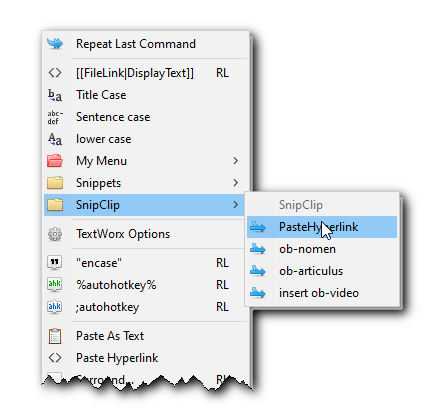
Example:
Consider this sample snippet. This is what goes in the ini file:
101=nomen-hyperlink|<a class="bgm-nomen internal-link" href="#clipboard#">#selection#</a>
First, copy something onto your clipboard. Since we are going to create a custom html hyperlink, fetch a url, such as this:
In the text where you are working, with the url (or ANY text, really) on your clipboard, then you select the text you want to replace (you would select only the text you want to replace with the snippet; in this case, just the highlighted text):
Here is some Display Text.
Use the hotkey, choose the command from the menu, and voila! The desired output:
<a class="bgm-nomen internal-link" href="http://somewhere.com">Display Text</a>
As you can see, the tokens were replaced with their corresponding values. The selected text is in its place and the clipboard contents are where you want them.
You can use the two tokens multiple times:
102=double-replacement|Once: #clipboard#, Twice: #clipboard# and finally: #selection#.
If you desire to change the tokens themselves, that also can be done.
Here is a sample configuration showing several custom html hyperlinks and a markup filelink.
•Set the maxcustom item to be the number of items you wish to show in the menu - it's okay to go over the number by a few counts. The menu only displays items below that number.
•For your inserts, the INI Key should be a number starting at 100. This number determines the order of the items when they show in the menu.
•The INI value has two parameters separated by a | pipe character.
•Parameter 1 is the title or your custom name of your snippet - it can be whatever you want (except that you can't use a semicolon ; character, because that turns the line into a comment in the INI file.
•Parameter 2 is your snippet with its tokens.
clipboardtoken=#clipboard#
selectiontoken=#selection#
maxcustom=10
100=PasteHyperlink|<a href="#clipboard#">#selection#</a>
101=ob-nomen|<a class="ob-nomen internal-link" href="#clipboard#">#selection#</a>
102=ob-articulus|<a class="ob-articulus internal-link" href="xxxx">#selection#</a>
103=markupfilelink|[[#clipboard#|#selection#]]